Nginx
配置文件
默认配置文件位于
/etc/nginx/nginx.conf
配置文件的结构
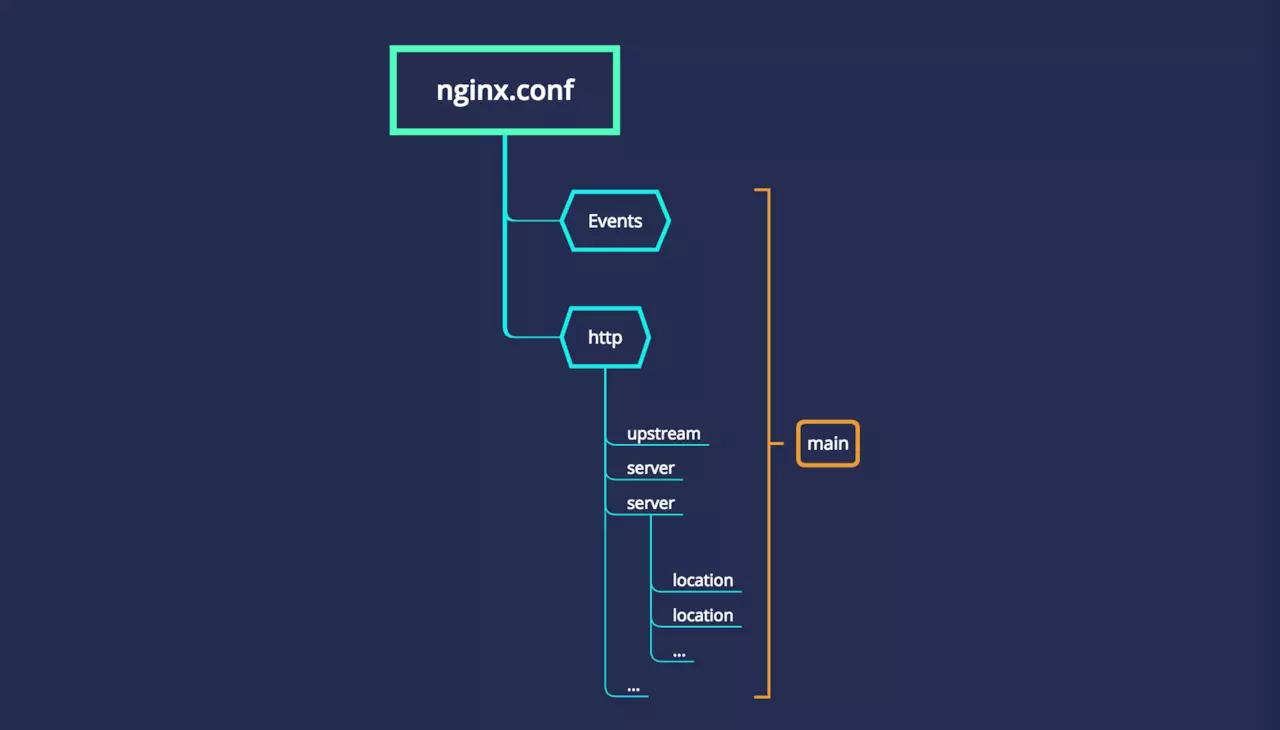
- main
- nginx 的全局配置
- events
- 设置网络连接
- http
- 可以嵌套多个 server,配置代理、缓存、日志等功能和第三方模块的配置
- upstream
- 配置后端服务器具体地址
- 负载均衡配置在这里配置
- server
- 配置虚拟主机的参数,可以配置多个
- location
- 可以配置多个 location
- 配置请求的路由
- location
- server
- location
- location
内置变量
- $host 请求信息中的 Host
- $request_method
- $args 请求参数
- $content_length 请求头中的 Content-length 字段
- $http_user_agent 客户端 agent 信息
- $http_cookie 客户端 cookie 信息
- $remote_port 客户端端口
- $remote_addr 客户端 IP
- $server_addr 服务器地址
- $server_protocol 请求使用的协议
- $server_name 服务器名称
- $server_port 服务器的端口号
模板
静态文件
server {
  listen 80;
  server_name www.taobao.com;

  location / {
    root   /Users/ringcrl/www/taobao;
    autoindex on;
    index  index.html;
  }
}
反向代理
server {
  listen 80;
  server_name api.taobao.com

  location / {
    proxy_pass http://127.0.0.1:5555;
    autoindex on;
    index index.html;
  }
}
可视化配置
https://www.digitalocean.com/community/tools/nginx
https://nginxconfig.io/
服务
nginx -t //检查配置文件语法问题
nginx -s reload  // 重新载入配置文件
nginx -s stop

# 查看服务运行情况
ps aux | grep nginx

# 查看端口号
netstat -tlnp

# systemctl 控制服务
systemctl stop nginx.service
systemctl start nginx.service
systemctl restart nginx.service
动态匹配
根据ip访问控制
location / {
  deny   123.9.51.42;
  allow  45.76.202.231;
}
适配 PC 或 Mobile
server{
        listen 80;
        server_name nginx2.jspang.com;
        location / {
         root /usr/share/nginx/pc;
         if ($http_user_agent ~* '(Android|webOS|iPhone|iPod|BlackBerry)') {
            root /usr/share/nginx/mobile;
         }
         index index.html;
        }
}

### 清除缓存

```nginx
location ~* \.(js|css|png|jpg|gif)$ {
    add_header Cache-Control no-store;
}
## 虚拟主机

?> 利用虚拟主机把多个不同域名的网站部署在同一台服务器上

```nginx
# 虚拟主机server块
server {
  # 端口
  listen   8080;
  # 匹配请求中的host值
  server_name  localhost;

  # 监听请求路径
  location / {
      # 查找目录
      root /source;
      # 默认查找
      index index.html index.htm;
  }
}

server{
  listen 80;
  server_name nginx2.jspang.com;
  root /usr/share/nginx/html/html8001;
  index index.html;
}
location
匹配规则
- /images/ 匹配任何以 /images/ 开头的地址
- / 通用匹配,如果没有其它匹配,任何请求都会匹配到
- ^~ 开头表示 uri 以某个常规字符串开头,不是正则匹配
- ~* 开头表示不区分大小写的正则匹配
- ~ 开头表示区分大小写的正则匹配
- = 开头表示精确匹配
- 如 config A 中只匹配根目录结尾的请求,后面不能带任何字符串
location  = / {
  # 精确匹配 /,主机名后面不能带任何字符串
  [ config A ]
}


location / {
  # 因为所有的地址都以 / 开头,所以这条规则将匹配到所有请求
  # 但是正则和最长字符串会优先匹配,无其他匹配内容的时候才走到这里
  [ config B ]
}

location /documents/ {
  # 匹配任何以 /documents/ 开头的地址,匹配符合以后,还要继续往下搜索
  # 只有后面的正则表达式没有匹配到时,这一条才会采用这一条
  [ config C ]
}

location ^~ /images/ {
  # 匹配任何以 /images/ 开头的地址,匹配符合以后,停止往下搜索正则,采用这一条
  [ config D ]
}

location ~* \.(gif|jpg|jpeg)$ {
  # 匹配所有以 gif、jpg 或 jpeg 结尾的请求
  # 所有请求 /images/ 下的图片会被 config D 处理,因为 ^~ 到达不了这一条正则
  [ config E ]
}
优先级
- location =
- location 完整路径
- location ^~ 开头路径
- location 、* 正则顺序
- location 部分起始路径
- location /
map
map $sent_http_content_type $expires {
    "text/html"                 epoch;
    "text/html; charset=utf-8"  epoch;
    "text/css"                  max;
    application/javascript     max;
    ~image/                    max;
    default                     off;
}

location / {
  expires $expires;
}
- epoch
- set “Expires” to the value “Thu, 01 Jan 1970 00:00:01 GMT”,
- set “Cache-Control” to “no-cache”.
最佳实践
# 第一个必选规则
location = / {
  proxy_pass http://tomcat:8080/index
}

# 第二个必选规则是处理静态文件请求,这是 nginx 作为 http 服务器的强项
# 有两种配置模式,目录匹配或后缀匹配,任选其一或搭配使用
location ^~ /static/ {
  root /webroot/static/;
}
location ~* \.(gif|jpg|jpeg|png|css|js|ico)$ {
  root /webroot/res/;
}

# 第三个规则就是通用规则,用来转发动态请求到后端应用服务器
# 非静态文件请求就默认是动态请求,自己根据实际把握
# 毕竟目前的一些框架的流行,带 .php、.jsp 后缀的情况很少了
location / {
  proxy_pass http://tomcat:8080/
}
实践
add_header
- http、server和location三处均可配置add_header,但起作用的是最接近的配置,往上的配置都会失效
- 仅当当前层级中没有 add_header 指令才会继承父级设置
referer
- 浏览器会在请求头加入 referer 字段,指示当前访问的网页
- 通过 referer 模块的 invalid_referer 变量拒绝非正常访问
- 图片防盗
- http 协议中,如果从一个网页跳到另一个网页,http 头字段里面会带个 Referer。图片服务器通过检测 Referer 是否来自规定域名,来进行防盗链
- 破解盗链
- 抹掉 referer
- 图片防盗
realip 真实用户 ip
- X-Forworded-For 头部传递多个 IP
- X-Real-IP 传递用户 IP
location / {
  root   /Users/ringcrl/www;
  index  index.html;
  proxy_set_header X-Real-IP $remote_addr;
  proxy_set_header X-Forwarded-For $proxy_add_x_forwarded_for;
}
limit_conn 与 limit_req
acccess 控制 IP 访问
location / {
  allow 192.168.1.255;
  deny all;
}
server_name_in_redirect 重定向
index 和 autoindex
- index 优先级高于 autoindex
server {
  server_name autoindex.chenng.cn;
  listen 8080;
  location / {
    alias html/;
    autoindex on;
    # index a.html
    autoindex_exact_size off;
    autoindex_format html;
    autoindex_localtime on;
  }
}
log 打印日志
$remote_addr 与 $http_x_forwarded_for 用以记录客户端的 ip 地址
$remote_user 用来记录客户端用户名称
$time_local 用来记录访问时间与时区
$request 用来记录请求的url与http协议
$status 用来记录请求状态;成功是200
$body_bytes_s ent 记录发送给客户端文件主体内容大小
$http_referer 用来记录从那个页面链接访问过来的
$http_user_agent 记录客户端浏览器的相关信息
keepalive 复用 TCP 连接
proxy_pass 反向代理解决跨域
proxy_set_header X-Real-IP $remote_addr;
proxy_set_header X-Forwarded-For $proxy_add_x_forwarded_for;
proxy_set_header Host $http_host;
proxy_set_header X-NginX-Proxy true;
proxy_set_header Upgrade $http_upgrade;
proxy_set_header Connection "upgrade";
proxy_pass http://127.0.0.1:$node_port$request_uri;
location /api {
    # 请求host传给后端
    proxy_set_header Host $http_host;
    # 请求ip 传给后端
    proxy_set_header X-Real-IP $remote_addr;
    # 请求协议传给后端
    proxy_set_header X-Scheme $scheme;
    # 路径重写
    rewrite  /api/(.*)  /$1  break;
    # 代理服务器
    proxy_pass http://localhost:9000;
}
- $http_host、$remote_addr、$scheme 为Nginx内置变量。
- break 继续本次请求后面的处理 ,停止匹配下面的location
- proxy_pass 代理服务器。
静态资源服务器
location ~* \.(png|gif|jpg|jpeg)$ {
    root    /root/static/;
    autoindex on;
    access_log  off;
    expires     10h;# 设置过期时间为10小时
}
缓存指令
HTTP2
优点:
- 传输数据量大幅度减少
- 以二进制方式传输
- 头部压缩
- 多路复用
- 服务端消息推送
server {
  server_name http2.chenng.cn;
  root html;

  location / {
    http2_push /mirrot.txt;
    http2_push /video.mp4;
  }

  listen 443 ssl http2;
  ssl_certificate ...;
  ssl_certificate_key ...;
}
跳转到 H5
server {
    listen 80;
    server_name www.xxx.com;

    access_log /var/log/nginx/access.log;
    error_log /var/log/nginx/error.log;

    gzip on;
    gzip_min_length 1k;
    gzip_comp_level 2;
    gzip_types text/plain application/javascript application/x-javascript text/css application/xml text/javascript image/jpeg image/gif image/png;

    set $mobile_rewrite do_not_perform;

    if ($http_user_agent ~* "(android|bb\d+|meego).+mobile|avantgo|bada\/|blackberry|blazer|compal|elaine|fennec|hiptop|iemobile|ip(hone|od)|iris|kindle|lge |maemo|midp|mmp|mobile.+firefox|netfront|opera m(ob|in)i|palm( os)?|phone|p(ixi|re)\/|plucker|pocket|psp|series(4|6)0|symbian|treo|up\.(browser|link)|vodafone|wap|windows ce|xda|xiino") {
      set $mobile_rewrite perform;
    }

    if ($http_user_agent ~* "^(1207|6310|6590|3gso|4thp|50[1-6]i|770s|802s|a wa|abac|ac(er|oo|s\-)|ai(ko|rn)|al(av|ca|co)|amoi|an(ex|ny|yw)|aptu|ar(ch|go)|as(te|us)|attw|au(di|\-m|r |s )|avan|be(ck|ll|nq)|bi(lb|rd)|bl(ac|az)|br(e|v)w|bumb|bw\-(n|u)|c55\/|capi|ccwa|cdm\-|cell|chtm|cldc|cmd\-|co(mp|nd)|craw|da(it|ll|ng)|dbte|dc\-s|devi|dica|dmob|do(c|p)o|ds(12|\-d)|el(49|ai)|em(l2|ul)|er(ic|k0)|esl8|ez([4-7]0|os|wa|ze)|fetc|fly(\-|_)|g1 u|g560|gene|gf\-5|g\-mo|go(\.w|od)|gr(ad|un)|haie|hcit|hd\-(m|p|t)|hei\-|hi(pt|ta)|hp( i|ip)|hs\-c|ht(c(\-| |_|a|g|p|s|t)|tp)|hu(aw|tc)|i\-(20|go|ma)|i230|iac( |\-|\/)|ibro|idea|ig01|ikom|im1k|inno|ipaq|iris|ja(t|v)a|jbro|jemu|jigs|kddi|keji|kgt( |\/)|klon|kpt |kwc\-|kyo(c|k)|le(no|xi)|lg( g|\/(k|l|u)|50|54|\-[a-w])|libw|lynx|m1\-w|m3ga|m50\/|ma(te|ui|xo)|mc(01|21|ca)|m\-cr|me(rc|ri)|mi(o8|oa|ts)|mmef|mo(01|02|bi|de|do|t(\-| |o|v)|zz)|mt(50|p1|v )|mwbp|mywa|n10[0-2]|n20[2-3]|n30(0|2)|n50(0|2|5)|n7(0(0|1)|10)|ne((c|m)\-|on|tf|wf|wg|wt)|nok(6|i)|nzph|o2im|op(ti|wv)|oran|owg1|p800|pan(a|d|t)|pdxg|pg(13|\-([1-8]|c))|phil|pire|pl(ay|uc)|pn\-2|po(ck|rt|se)|prox|psio|pt\-g|qa\-a|qc(07|12|21|32|60|\-[2-7]|i\-)|qtek|r380|r600|raks|rim9|ro(ve|zo)|s55\/|sa(ge|ma|mm|ms|ny|va)|sc(01|h\-|oo|p\-)|sdk\/|se(c(\-|0|1)|47|mc|nd|ri)|sgh\-|shar|sie(\-|m)|sk\-0|sl(45|id)|sm(al|ar|b3|it|t5)|so(ft|ny)|sp(01|h\-|v\-|v )|sy(01|mb)|t2(18|50)|t6(00|10|18)|ta(gt|lk)|tcl\-|tdg\-|tel(i|m)|tim\-|t\-mo|to(pl|sh)|ts(70|m\-|m3|m5)|tx\-9|up(\.b|g1|si)|utst|v400|v750|veri|vi(rg|te)|vk(40|5[0-3]|\-v)|vm40|voda|vulc|vx(52|53|60|61|70|80|81|83|85|98)|w3c(\-| )|webc|whit|wi(g |nc|nw)|wmlb|wonu|x700|yas\-|your|zeto|zte\-)") {
      set $mobile_rewrite perform;
    }

    location / {
      proxy_pass http://10.81.62.45:32520/static/;
      proxy_set_header Host $http_host;
    }
}
开启 gzip
- 经过gzip压缩后,页面大小可以变为原来的30%甚至更小
- gzip是需要服务器和浏览器同时支持的
- 当浏览器支持gzip压缩时,会在请求消息中包含Accept-Encoding:gzip
- 这样Nginx就会向浏览器发送听过gzip后的内容,同时在相应信息头中加入Content-Encoding:gzip
server {
    # 开启gzip 压缩
    gzip on;
    # 设置gzip所需的http协议最低版本 (HTTP/1.1, HTTP/1.0)
    gzip_http_version 1.1;
    # 设置压缩级别,压缩级别越高压缩时间越长  (1-9)
    gzip_comp_level 4;
    # 设置压缩的最小字节数, 页面Content-Length获取
    gzip_min_length 1000;
    # 设置压缩文件的类型  (text/html)
    gzip_types text/plain application/javascript text/css;
}
负载均衡
- 轮询(默认),请求过来后,Nginx 随机分配流量到任一服务器
- weight=number 设置服务器的权重,默认为1,权重大的会被优先分配
upstream backend { server 127.0.0.1:3000 weight=2; server 127.0.0.1:3001 weight=1; } - backup 标记为备份服务器。当主服务器不可用时,将传递与备份服务器的连接。
upstream backend { server 127.0.0.1:3000 backup; server 127.0.0.1:3001; } - ip_hash 保持会话,保证同一客户端始终访问一台服务器。
upstream backend { ip_hash; server 127.0.0.1:3000 backup; server 127.0.0.1:3001; } - least_conn 优先分配最少连接数的服务器,避免服务器超载请求过多。
upstream backend {
    least_conn;
    server 127.0.0.1:3000;
    server 127.0.0.1:3001;
}
一个例子
http {

    upstream backend {
        server 127.0.0.1:3000;
        server 127.0.0.1:3001;
    }

    ...
    server {
        listen      9000;
        server_name localhost;

        location / {
            proxy_set_header Host $http_host;
            proxy_set_header X-Real-IP $remote_addr;
            proxy_set_header X-Scheme $scheme;

            proxy_pass backend;
        }
    }
}
参考
https://zhuanlan.zhihu.com/p/51770774
https://juejin.im/post/5bd7a6046fb9a05d2c43f8c7#heading-1