Appearance
expo 教程
介绍
Expo是一组工具、库和服务,可以通过编写JavaScript来构建本地的ios和Android应用程序。
Expo Apps是包含了Expo SDK的react native Apps,SDK是一个native-and-js的库,它包提供对设备系统的访问功能,像照相机、联系人、本地存储和其他硬件)。这意味着你不需要使用Xcode或Android的环境,或写任何代码也使得你的pure-JS项目非常便携,因为它可以运行在任何自然环境包含Expo SDK。
template
https://github.com/expo/examples
https://github.com/expo/expo/tree/master/templates
workflow
- bare workflow
- Managed workflow 托管工作流
在管理工作流中,你只需要编写JavaScript / TypeScript,而Expo工具和服务会为你处理一切。
在裸工作流中,您可以完全控制本机项目的每个方面,而Expo工具和服务则比较有限。
Managed Expo projects don't support custom native code, including third-party libraries which require custom native components. In a managed project, you only write JavaScript.
托管工作流不支持写原生代码,任何时候都可以使用 expo eject 来完全控制,类似 create-react-app那个一样,暴露所有配置
Managed 模式
Managed模式是由expo-cli生成的,其中自带了完整的Expo SDK,也就是大家最喜欢的Expo全家桶。
Expo全家桶为react native应用开发、调试、发布流程做了极大的简化,也是新手玩家的不二之选。
Bare 模式
Bare模式带来了更高的可控性(Native层的自定义,选择性引入Expo SDK...),当然这种可控性对开发者带来的也就是更复杂的开发体验,对开发者的技能知识要求相对较高。
Unimodules
还记得令人厌恶的Native Module的倒入过程吗?修改客户端代码对于react native开发者来说是一个极大的挑战,简简单单装个包动不动一天就过去了。在下一个版本中unimodules将彻底抹平这一步,只要npm install,只要npm install,只要npm install,就足够了。
- 通过Expo工具链开发的应用可以更加无缝地转化成react native应用
- unimodules输出的包通用性极高,甚至可以被Flutter所使用
- 实现Native Module的大一统
app.json
https://docs.expo.io/versions/v41.0.0/config/app/
metro.config.js
https://docs.expo.io/versions/v41.0.0/config/metro/
Expo SDK
https://docs.expo.io/versions/latest/
AppLoading
AppleAuthentication
Checkbox
Constants
Contacts
Crypto
DateTimePicker
Device 设备相关信息
FileSystem
Font
ImagePicker
KeepAwake
LinearGradient
Linking 和其他APP跳转
Localization 国际化 i18n
Location 位置
Lottie 动画
MapView 地图
Network 网络信息
Notifications 通知
Payments 支付
Permissions 权限
Picker 选型
ScreenCapture 截图
ScreenOrientation 屏幕方向
SecureStore 保密存储
Sensors 传感器
Slider 滑条
SMS 短信
SplashScreen 启动页
SQLite
StatusBar
StoreReview 去评分
Svg
TaskManager 后台任务
Updates OTA更新
WebView
Guides
Fundamentals 基础
logging
debugging
https://docs.expo.dev/workflow/debugging/#my-app-crashes-on-certain-older-devices
using lib
https://reactnative.directory/
javascript
expo install @react-navigation/nativeViewing logs
UI Programming
Assorted Guides 各种指南
Routing & Navigation
使用 react-navigation
Fonts
Icons
@expo/vector-icons
bash
import * as React from 'react';
import { View, StyleSheet } from 'react-native';
import { Ionicons } from '@expo/vector-icons';

export default function App() {
  return (
    <View style={styles.container}>
      <Ionicons name="md-checkmark-circle" size={32} color="green" />
    </View>
  );
}
Authentication
Light and Dark modes 黑暗模式
If working with an iOS emulator locally, you can use the command + shift + a shortcut to toggle between light and dark mode.
javascript
import { Appearance, useColorScheme } from 'react-native';

function MyComponent() {
  let colorScheme = useColorScheme();

  if (colorScheme === 'dark') {
    // render some dark thing
  } else {
    // render some light thing
  }
}


// component
import React from 'react';
import { Text, StyleSheet, View, useColorScheme } from 'react-native';
import { StatusBar } from 'expo-status-bar'; // automatically switches bar style based on theme!

export default function App() {
  const colorScheme = useColorScheme();

  const themeTextStyle = colorScheme === 'light' ? styles.lightThemeText : styles.darkThemeText;
  const themeContainerStyle =
    colorScheme === 'light' ? styles.lightContainer : styles.darkContainer;

  return (
    <View style={[styles.container, themeContainerStyle]}>
      <Text style={[styles.text, themeTextStyle]}>Color scheme: {colorScheme}</Text>
      <StatusBar />
    </View>
  );
}

const styles = StyleSheet.create({
  container: {
    flex: 1,
    alignItems: 'center',
    justifyContent: 'center',
  },
  lightContainer: {
    backgroundColor: '#d0d0c0',
  },
  darkContainer: {
    backgroundColor: '#242c40',
  },
  lightThemeText: {
    color: '#242c40',
  },
  darkThemeText: {
    color: '#d0d0c0',
  },
OTA Updates
javascript
import * as Updates from 'expo-updates';

try {
  const update = await Updates.checkForUpdateAsync();
  if (update.isAvailable) {
    await Updates.fetchUpdateAsync();
    // ... notify user of update ...
    await Updates.reloadAsync();
  }
} catch (e) {
  // handle or log error
}
Offline Support 离线支持
https://docs.expo.dev/guides/offline-support/
默认,静态资源会打包到代码中,OTA 的更新会从CDN下载
EXPO可以在构建过程中将资源捆绑到您的独立二进制文件中,这样即使用户以前从未运行过您的应用程序,也可以立即使用它们。
使用 NetInfo
Splash screen 启动页
App icons App 图标
Status Bar 状态栏
javascript
import React from 'react';
import { View } from 'react-native';
import { StatusBar } from 'expo-status-bar';

export default function Playlists() {
  return (
    <View>
      {/* other code here to show the screen */}

      {/* use light text instead of dark text in the status bar to provide more contrast with a dark background */}
      <StatusBar style="light" />
    </View>
  );
}
Asset Caching 资产缓存
javascript
async _loadAssetsAsync() {
    const imageAssets = cacheImages([
      'https://www.google.com/images/branding/googlelogo/2x/googlelogo_color_272x92dp.png',
      require('./assets/images/circle.jpg'),
    ]);

    const fontAssets = cacheFonts([FontAwesome.font]);

    await Promise.all([...imageAssets, ...fontAssets]);
  }
Permissions 权限
要在iOS上请求权限,您必须描述请求权限的原因,并安装请求和使用权限的库。使用bare工作流时,您必须编辑项目Info.plist。
In the bare workflow, permissions are controlled in your project AndroidManifest.xml.
Linking
Linking from your app to other apps
比如跳转到别的App,拨打电话,发送邮件
Environment variables 环境变量
javascript
module.exports = () => {
  if (process.env.MY_ENVIRONMENT === 'production') {
    return {
      /* your production config */
    };
  } else {
    return {
      /* your development config */
    };
  }
};
publishing updates
- Increment the Expo SDK Version
- Change anything under the ios, android, or notification keys
- Change your app splash
- Change your app icon
- Change your app name
- Change your app owner
- Change your app scheme
- Change your facebookScheme
- Change your bundled assets under assetBundlePatterns
User Interface Component Libraries
- React Native Paper, and their docs
- React Native UI Lib, and their docs.
- React Native Elements, and their docs
- Native Base, and their docs
- React Native Material UI, and their docs
- React Native UI Kitten, and their docs
- React Native iOS Kit, and their docs
Bare workflow
workflow
updating your app
https://docs.expo.dev/bare/updating-your-app/
Push Notifications
1 with Expo's Push API
Here are a few things you'll have to handle yourself if you choose to write your own server for FCM and APNs:Differentiating between native iOS & Android device tokens on your backend
- Twice the amount of backend code to write and maintain (code for communicating with FCM, and then code for communicating with APNs)
- Fetching responses from FCM and APNs to check if your notification went through, error handling, credentials management
Distributing Your App 应用分发
building-standalone-apps
app.json
javascript
 {
   "expo": {
    "name": "Your App Name",
    "icon": "./path/to/your/app-icon.png",
    "version": "1.0.0",
    "slug": "your-app-slug",
    "ios": {
      "bundleIdentifier": "com.yourcompany.yourappname",
      "buildNumber": "1.0.0"
    },
    "android": {
      "package": "com.yourcompany.yourappname",
      "versionCode": 1
    }
   }
 }
Release Channel
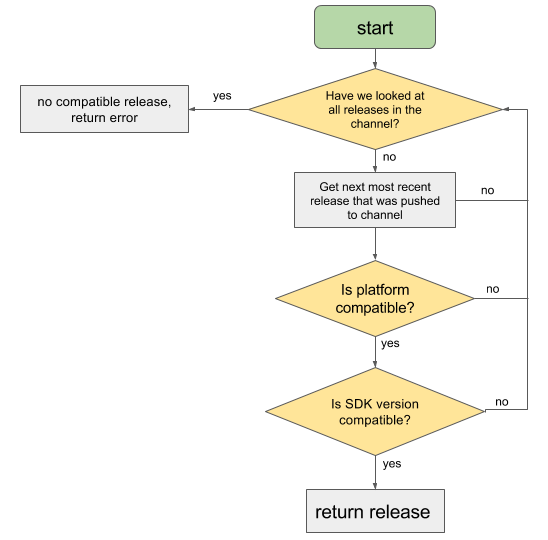
On the production stack, release v1 of your app by running expo publish --release-channel prod-v1. You can build this version of your app into a standalone ipa by running expo build:ios --release-channel prod-v1. You can push updates to your app by publishing to the prod-v1 channel. The standalone app will update with the most recent compatible version of your app on the prod-v1 channel.
You can edit the native project's release channel by modifying the EXUpdatesReleaseChannel key in Expo.plist (iOS) or the releaseChannel meta-data tag value in AndroidManifest.xml (Android). Read this guide for more information on configuring OTA Updates in a bare app.
- iOS
- EXUpdatesReleaseChannel [default]
yaml
  <dict>
    <key>EXUpdatesCheckOnLaunch</key>
    <string>ALWAYS</string>
    <key>EXUpdatesEnabled</key>
    <true/>
    <key>EXUpdatesLaunchWaitMs</key>
    <integer>300000</integer>
    <key>EXUpdatesSDKVersion</key>
    <string>41.0.0</string>
    <key>EXUpdatesURL</key>
    <string>https://exp.host/@bhaltair/vibra</string>
</dict>- Android
bash
<meta-data android:name="expo.modules.updates.ENABLED" android:value="true"/>
<meta-data android:name="expo.modules.updates.EXPO_RELEASE_CHANNEL" android:value="default" />
<meta-data android:name="expo.modules.updates.EXPO_SDK_VERSION" android:value="41.0.0" />
<meta-data android:name="expo.modules.updates.EXPO_UPDATES_CHECK_ON_LAUNCH" android:value="ALWAYS"/>
<meta-data android:name="expo.modules.updates.EXPO_UPDATES_LAUNCH_WAIT_MS" android:value="300000"/>
<meta-data android:name="expo.modules.updates.EXPO_UPDATE_URL" android:value="https://www.vibra.com/android-index.json" />
或者直接修改 app.config.ts
json
  updates: {
    enabled: true,
    fallbackToCacheTimeout: 300000
  },
然后 expo prebuild
yaml
expo publish:history [--release-channel ] [--count ]

expo publish:history --platform ios

expo publish:details --publish-id 80b1ffd7-4e05-4851-95f9-697e122033c3
app-signing
Google requires all Android apps to be digitally signed with a certificate before they are installed on a device or updated. Usually a private key and its public certificate are stored in a keystore. In the past, APKs uploaded to the store were required to be signed with the app signing certificate (certificate that will be attached to the app in the Play Store), and if the keystore was lost there was no way to recover or reset it. Now, you can opt in to App Signing by Google Play and simply upload an APK signed with an upload certificate, and Google Play will automatically replace it with the app signing certificate. Both the old method (app signing certificate) and new method (upload certificate) are essentially the same mechanism, but using the new method, if your upload keystore is lost or compromised, you can contact the Google Play support team to reset the key.
1 上传证书签名
2 App 签名密钥
The 3 primary iOS credentials, all of which are associated with your Apple Developer account, are:
- Distribution Certificate 分发证书
- Provisioning Profiles 配置文件
- Push Notification Keys 推送通知密钥
Deploying to App Stores 注意事项
- Make app loading seamless
- Play nicely with the system UI
- Tailor your app metadata 定制元数据
- icon
- primarycolor [在Android上,这将决定您的应用程序在多任务处理器中的颜色。目前iOS不使用此功能]
- Make sure has a valid . Take care in choosing these, as you will not be able to change them later.
- Versioning your App
- Privacy Policy 隐私政策
- iOS-specific guidelines
- All apps in the App Store must abide by the App Store Review Guidelines. 审核指南
- Apple will ask you whether your app uses the IDFA?
- Android Permissions
- Common App Rejections
- System permissions dialogs on iOS
- Localizing your iOS app 国际化
Test it on your device or simulator
- To run it on your Android emulator, first build your project with the apk flag by running expo build:android -t apk, and you can drag and drop the .apk into the emulator.
- To run it on your Android device, make sure you have the Android platform tools installed along with adb, then just run adb install app-filename.apk with USB debugging enabled on your device and the device plugged in.
- To run it on your iOS simulator, first build your project with the simulator flag by running expo build:ios -t simulator, then download the artifact with the link printed when your build completes. To install the resulting tar.gz file, unzip it and drag-and-drop it into your iOS simulator. If you'd like to install it from the command line, run tar -xvzf your-app.tar.gz to unpack the file, open a simulator, then run xcrun simctl install booted <path to .app>.
- To test a device build with Apple TestFlight, download the .ipa file to your local machine. Within App Store Connect, click the plus icon and create a New App. Make sure your bundleIdentifier matches what you've placed in app.json. Now, you need to use Xcode or Transporter (previously known as Application Loader) to upload the .ipa you got from expo build:ios. Once you do that, you can check the status of your build under Activity. Processing an app can take 10-15 minutes before it shows up under available builds.
Uploading Apps to Store
Hosting Updates on Your Servers
https://docs.expo.dev/distribution/hosting-your-app/
Update your app
there are a couple reasons why you might want to rebuild and resubmit the native binaries: 什么情况下,需要重新打包?而不能热更新
- If you want to change native metadata like the app's name or icon
- If you upgrade to a newer SDK version of your app (which requires new native code)
Optimizing Updates
Expo Accounts
Technical specs
expo-updates
更新: 2021-08-18 11:29:59
原文: https://www.yuque.com/u3641/dxlfpu/rozg7d